Introduction
I am a big fan of automation and tooling, and I love setting up code formatters, linters, and language servers to make editing as smooth as possible. For many languages, such as Python, C++, JSON, and YAML, this has been relatively straightforward: I’ve been able to set everything to my liking. But Markdown has been a recurring thorn in my side.
Tools such as Prettier, Marksman, and markdownlint offer formatting, language server features, and linting. But most of my Markdown writing happens in Quarto and R Markdown1, and I’ve struggled to make these tools work with the syntax I use. Running Prettier on my Quarto documents has sometimes mangled fenced divs and tables. I’ve also missed features I had when editing LaTeX, where my language server, texlab, understands and can analyze citations, footnotes, and much more.
1 Though I use R Markdown less and less.
Around a year ago, I decided to try to fix this by building a tool myself. Quarto and R Markdown were the starting point, but the project has since grown to support Markdown more broadly, including flavors such as MyST and mdsvex.
Panache
Panache is a language server, formatter, and linter for Markdown. It supports flavors including CommonMark, GitHub-Flavored Markdown, MyST, mdsvex, Pandoc Markdown, Quarto, and R Markdown. It is written in Rust and provides both a command-line tool and editor integration through the Language Server Protocol (LSP).
The idea is to bring the conveniences of code editing to document writing. The formatter takes care of layout, the linter catches problems such as unresolved references, and the language server helps you navigate and edit the document. All three share the same parser, so they work from the same understanding of your Markdown.
The parser builds a lossless concrete syntax tree, retaining every character in the source, including comments and whitespace. This gives the formatter the source details it needs to preserve meaning while changing layout. Panache also aims for idempotent formatting: once a document has been formatted, running the formatter again should leave it unchanged.
Markdown Comes in Many Flavors
Markdown is a family of languages with varying features and syntactic rules. A GitHub README might need pipe tables and task lists. MyST documentation uses directives and roles, while mdsvex mixes Markdown with Svelte components and expressions. A Quarto manuscript adds citations, cross-references, fenced divs, and executable code chunks. A formatter needs to recognize these constructs to preserve what the author meant.
Most of these flavors can be described as a set of basic Markdown features—headings, links, emphasis, and so on—plus extensions such as citations and fenced code blocks. But even when two flavors include the same feature, they can use different rules to recognize it. CommonMark and Pandoc Markdown, for instance, recognize emphasis differently and have different rules for when blank lines end or continue a list.
Panache therefore distinguishes between dialects and flavors. A flavor determines which features (extensions) are supported, and a dialect determines the rules for parsing them. Thankfully, there aren’t that many dialects: John Gruber’s original Markdown, CommonMark, and Pandoc Markdown are the ones that first come to mind. Not every Markdown feature is treated differently, and most differences concern whitespace around elements, mainly indentation and blank lines.
For .qmd, .Rmd, .svx, and .svelte.md files, Panache selects the corresponding flavor from the file extension. For .md files, you can choose a default flavor and override it for particular paths. A project with MyST documentation and a GitHub README could use this panache.toml:
flavor = "commonmark"

[flavors]
gfm = ["README.md", "CONTRIBUTING.md"]
myst = ["docs/**/*.md"]
The flavors provide a starting point, but you can also enable or disable individual syntax features through extensions. Each extension is a parser switch, with a default chosen for each flavor. For example, to add citations to CommonMark:
flavor = "commonmark"

[extensions]
citations = true
There are switches for tables, footnotes, math delimiters, heading attributes, and many other features. The goal is to cover all of Pandoc’s extensions plus whatever else is needed to support a variety of flavors. Overrides can also be scoped to a particular flavor. This lets you match the syntax your publishing tool accepts without adopting every extension in another flavor. The configuration guide lists the available extensions and their defaults.
These settings tell Panache how to read your source. They do not change the configuration of Quarto, Pandoc, or whichever tool renders the document.
Formatting the Document and Its Code
To format a document in place, run:
panache format manuscript.qmdPanache handles paragraphs, lists, tables, math, and YAML metadata, including Quarto’s #| chunk options. It aims to keep the source readable, with consistent spacing and layout, while preserving the document’s meaning.
Try it below: edit the source or choose an example to see how Panache formats it. Formatting runs entirely in your browser.
This demo formats Quarto prose, tables, and math. Code inside chunks is left as written. For more options, try the full playground.
You can configure the formatting separately from the Markdown syntax. For instance, these settings reflow paragraphs to a width of 80 columns:
[format]
wrap = "reflow"
line-width = 80
If you prefer one sentence per line, use wrap = "sentence". If you want to keep your existing paragraph line breaks, use wrap = "preserve". The fourth option, wrap = "semantic", keeps the breaks you’ve placed, perhaps after a clause, and adds breaks at sentence boundaries. I like having this choice for prose, where line breaks can be useful when reviewing changes in Git.
Panache also formats the math itself. It adjusts operator spacing, indents math environments, and aligns columns in environments such as aligned and array. Choose the math example in the demo above to see it in action. By default, Panache also wraps long expressions (math = "reflow" in the [format] section). You can use math = "preserve" to retain your line breaks while still formatting the content, or math = "verbatim" to leave the content untouched. The math formatting guide explains the options.
Markdown documents often contain code, whether as examples in a README or executable chunks in a Quarto manuscript. Panache can pass code blocks to external formatters, so formatting the document also formats the code inside it. Add this to panache.toml, for example:
[formatters]
r = "arity"
python = "ruff"
latex = "badness"
With those tools installed and available on PATH, Panache uses Arity for R, Ruff Ruff for Python, and Badness for LaTeX.2 The presets supply the necessary arguments but you can also define custom formatter commands or chain multiple formatters for a language, such as running isort before Black. The formatter reference lists the built-in presets. This is particularly useful for mixed-language documents: one formatting command handles the prose and delegates each code block to the appropriate tool.
2 Apologies for the flagrant self-promotion here 😉.
Sometimes a particular example needs a different layout, perhaps to fit on a slide or in a paper’s narrow column. Panache’s code-style metadata lets you set formatting options for an entire document or override them for one chunk:
```{python}
#| code-style:
#|   line-width: 40

result = fit_model(predictors, response, regularization=0.1)
```
With Ruff configured as above, this chunk uses a line width of 40. A code-style mapping in the document’s YAML frontmatter supplies defaults for all its code blocks, and chunk options override individual keys. This is a Panache convention, with built-in support in Arity, Black, Prettier, and Ruff. The available options depend on the formatter. See code style metadata for details.
I have raised a discussion topic on the Quarto CLI discussion board about sanctioning code-style as a Quarto chunk option. Please chime in there if you think it would be useful to have this feature built into Quarto!
Linting Across Code Chunks
The built-in linter checks document structure and references, including heading hierarchy, duplicate definitions, and unresolved citations. You can run it from the terminal:
panache lint manuscript.qmdFor Quarto documents, the linter also validates YAML frontmatter, #| chunk options, and project files such as _quarto.yml and _metadata.yml against Quarto’s schema. For example, toc: maybe produces a warning because toc expects a boolean. You can also enable checks for misspelled keys:
[lint.rules]
quarto-schema-unknown-key = true
Other rules catch problems that can be easy to miss in the rendered document: ambiguous YAML values that Quarto and Pandoc interpret differently, comments that cause Pandoc to drop a heading’s attributes, and unclosed braces or mismatched environments in math. The lint rule reference describes these checks and how to configure them.
External linters check the code inside the document. For example, this configuration enables Ruff for Python and ShellCheck for shell code:
[linters]
python = "ruff"
sh = "shellcheck"
One detail matters here: code chunks in a computational document often depend on earlier chunks. Linting each chunk separately can produce misleading warnings about variables defined elsewhere. In Quarto documents, Panache groups executable chunks and supported executable inline expressions by language and sends each group to its linter in document order. Displayed code blocks and chunks explicitly marked with a literal eval: false are each linted separately. Panache then maps diagnostics back to their positions in the original document. Code from Quarto include shortcodes participates in the surrounding execution context, too.
That means a variable assigned in the first Python chunk is visible when Ruff checks its use in the next one. In the editor, a warning still points at the relevant line in the .qmd file. Supported fixes are available through code actions or panache lint --fix.
External linters are opt-in and must be installed separately. They use a fixed set of presets, since each integration needs to understand the tool’s diagnostics and fixes.
Working in the Editor
The language server brings these features into the editor and adds navigation, completion, and refactoring. When writing a paper, for example, you can complete a citation key from the bibliography, hover over it to see the entry, and jump to its definition. For Quarto cross-references, you can jump from @fig-results to the figure’s label or rename the label and its references together.
Panache also understands Quarto and Bookdown project structure, so it can resolve references across files. That becomes useful as soon as a manuscript grows into several chapters or a website shares a bibliography across pages. You can find the places where a citation or cross-reference is used, or search headings across the project to jump to a section.
In editors that support linked editing, you can also edit a label and have its linked occurrences in the current document update as you type. This works for reference links, footnotes, citations, and Quarto cross-references, among others.
When you rename a file in an editor that supports LSP file renaming, Panache can update the paths that point to it. This includes links, images, Quarto shortcodes, and supported metadata paths, such as bibliography files. Moving a chapter or renaming an image therefore need not leave you searching the project for every reference to its old name.
There are smaller conveniences, too: a document outline, folding for sections and code blocks, completion for file paths, and code actions to convert between inline and reference links or footnotes. You can also convert between pipe, simple, multiline, and grid tables when the destination syntax is enabled.
The VS Code extension bundles a Panache binary for supported platforms and starts the language server automatically, with a download fallback when no binary is bundled. It also works in Positron. For Neovim, Helix, Emacs, and Zed, the language server guide has setup instructions.
For RStudio, the Panache R package provides addins to format the active document or selected blocks. The package is in early development and provides formatting; linting is available through the command-line tool or an editor connected to the language server.
Getting Started
If you want to try Panache without installing anything, there is a browser playground. Paste in a document to experiment with formatting and configuration.
You can install the command-line tool with Cargo:
cargo install --locked panachePackages are also available through Homebrew, npm, PyPI, and Nixpkgs, along with prebuilt binaries. The installation guide covers these options.
To check a whole project, run these commands from its root:
panache format --check .
panache lint .
The first reports files that need formatting without changing them. The second reports lint diagnostics. Both can run in CI, and there are integrations for pre-commit and GitHub Actions.
Performance
I also want formatting to be fast enough that I don’t think about it when saving a file. Panache’s native executable has low startup overhead, and the project includes benchmarks against other formatters on real Markdown and Quarto sources, comparisons of linters, and measurements of language-server responsiveness.
Formatting
Figure 1 shows a selection from the recorded benchmark results, collected on September 10, 2026, on Linux with an Intel Core Ultra 7 155U. Values are mean wall-clock times in milliseconds for separate command-line invocations, including process startup.
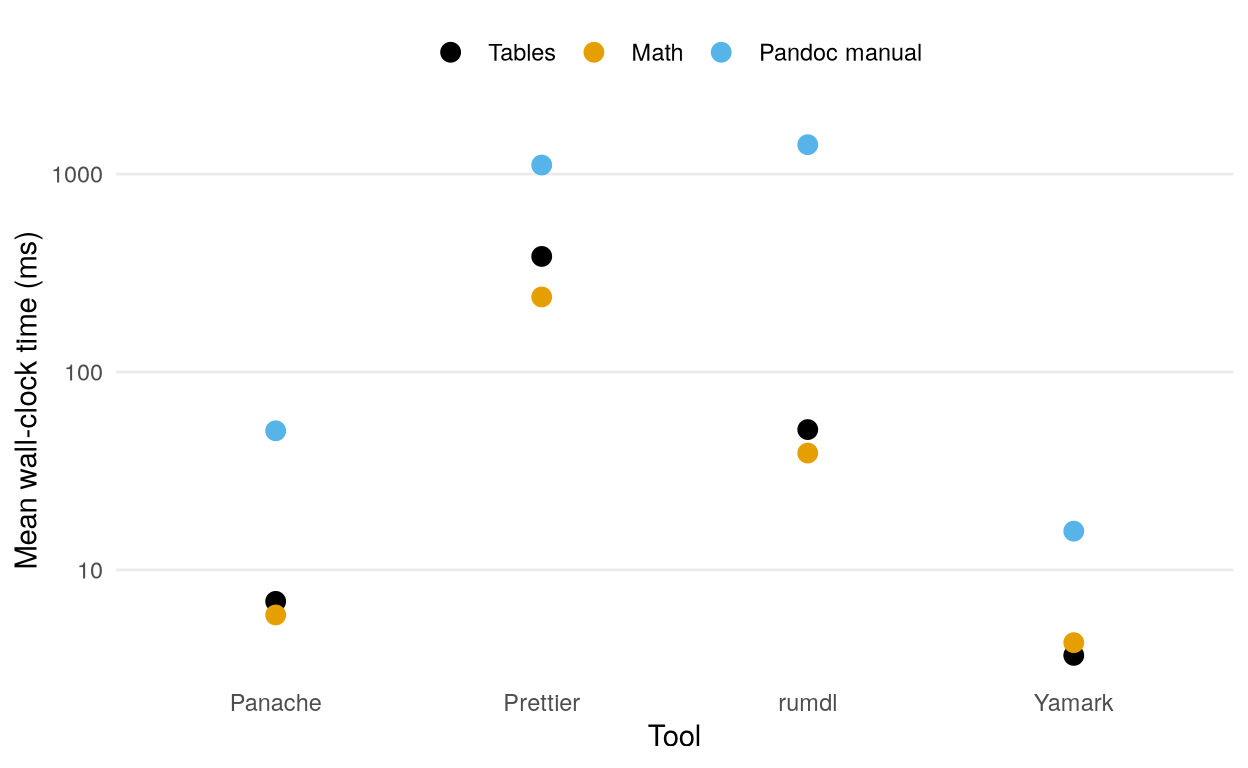
These measurements used Panache 3.9.0, Prettier 3.9.6, rumdl 0.2.52, and Yamark 0.3.0. On these three inputs, Panache was roughly 22 to 55 times as fast as Prettier. Yamark was faster still. Panache, rumdl, and Yamark are all written in Rust, so it is not surprising that they are faster than Prettier, which is written in JavaScript.
Yamark is faster than Panache partly because it does less work: for instance, it doesn’t format math or support Panache’s full extension and flavor system. I will continue to optimize Panache, but I’m not sure it will ever be as fast as Yamark. Still, I think formatting the Pandoc manual’s more than 8,000 lines in 50 ms is plenty fast enough!
Linting
Figure 2 compares the linters on the same three documents. I collected these results on October 9, 2026, on Linux with an Intel Core Ultra 7 155U, using Panache 3.14.0, rumdl 0.2.64, mado 0.3.2, and markdownlint 0.49.1. As with the formatter comparison, the measurements include process startup. CLI caches and external linters were disabled. Mado skips .qmd files, so I gave it identical copies with a .md extension.
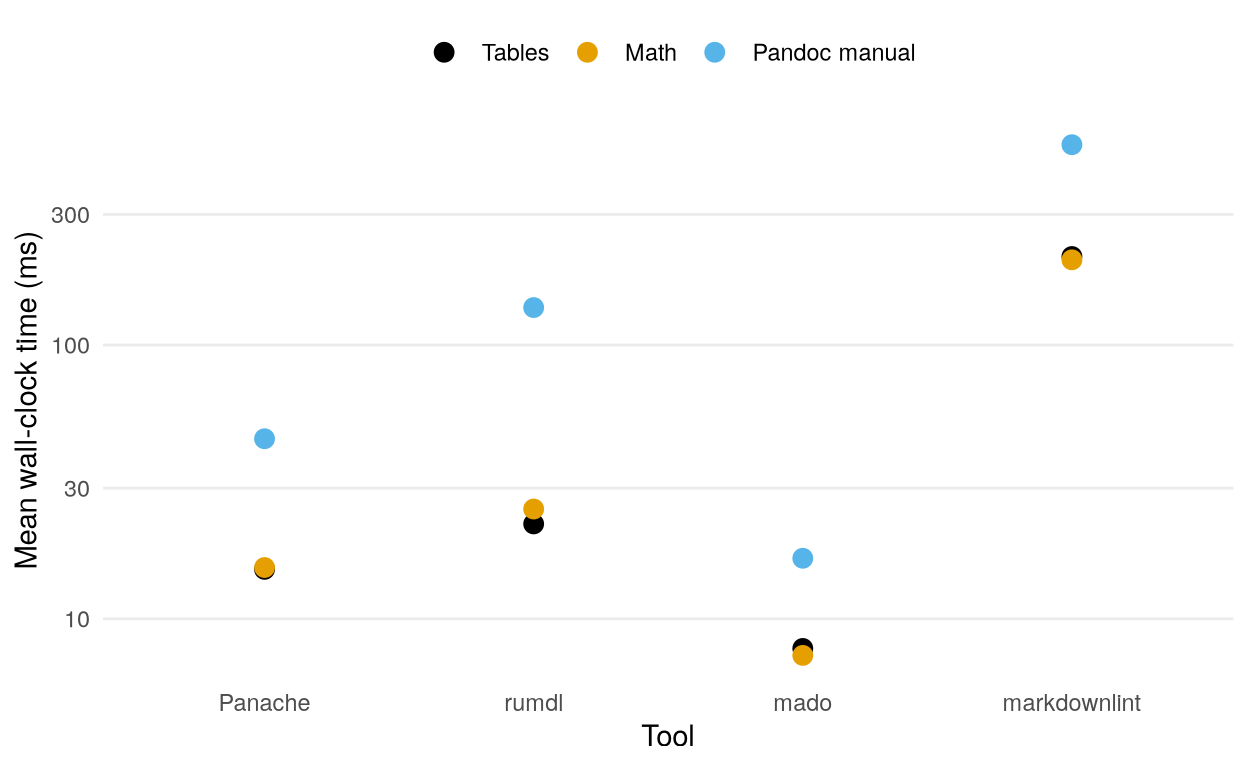
Panache linted the two Quarto documents in about 15 ms each and the Pandoc manual in about 45 ms. Mado was faster on all three inputs, while rumdl and markdownlint took longer. The linters check different rules and support different syntax, so the timings compare the work each tool does on these documents.
Language Server
For the language server, I care most about how quickly it responds while I’m editing. Figure 3 compares Panache 3.11.0 with Marksman 2026-02-08, using measurements collected on September 20, 2026, on Linux with an AMD Ryzen 9 7900. The benchmark opens the five largest Markdown files in the Rust Book and starts three fresh processes per server. It times request round trips over stdio after warmup, then makes 1,000 reference-label edits per process, following each edit with a definition request. The plot shows a selection of the shared Markdown navigation features.
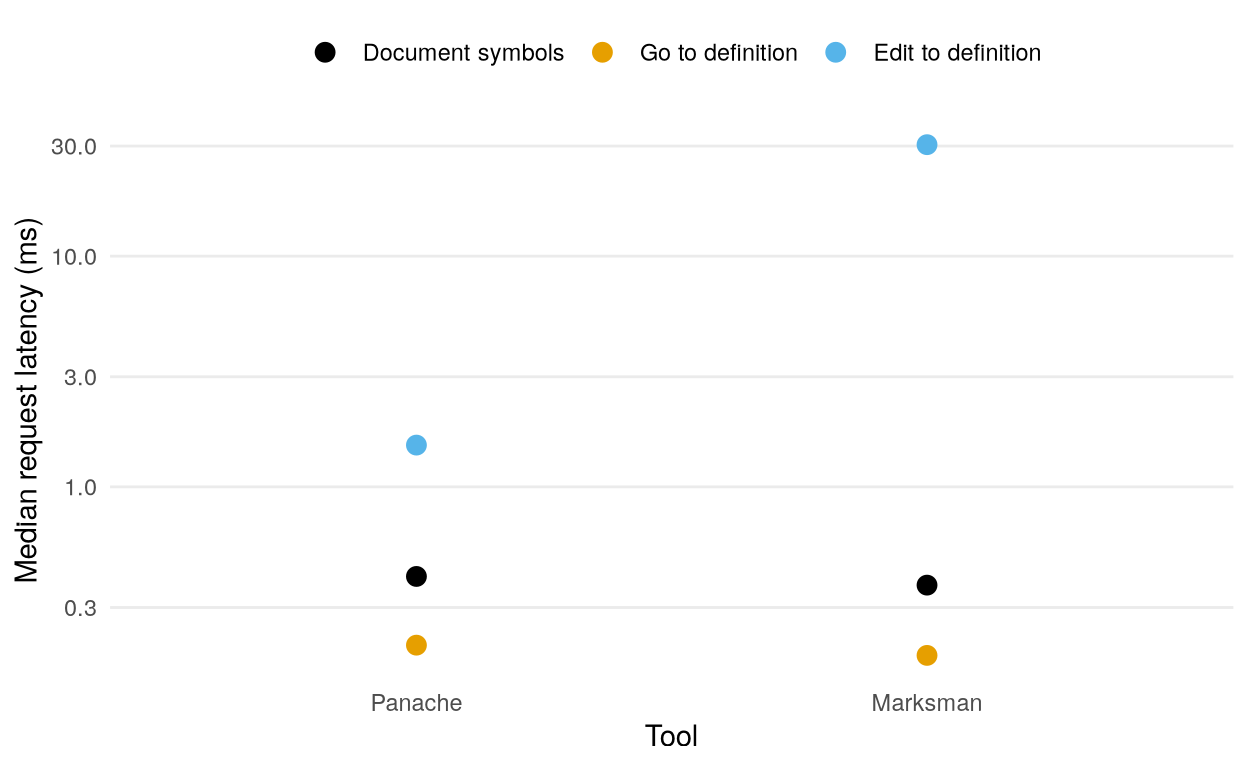
Both servers answered the warm document-symbol and definition requests in well under a millisecond. The larger difference came after an edit: Panache’s median edit-to-definition latency was about 1.5 ms, compared with 30 ms for Marksman. Their 95th percentiles were about 2.1 ms and 46 ms, respectively.
The performance page has the full results, repository-wide comparisons, and commands for reproducing the benchmarks. If you try Panache on your own documents, I’d be happy to hear how it works for you. Bug reports and examples of syntax it handles poorly are welcome on GitHub.